 Widget Vault
Live widgets for your Mac desktop.
Clock, weather, calendar, to-dos, Pomodoro timer, battery, disk space and clipboard history — 10 interactive desktop widgets with 55+ themed styles. No ads. No tracking. Everything stays on your Mac.

Free download · macOS 14 Sonoma or later · About 5 MB
Free on the Mac App Store
Download Widget Vault and get the analog clock, digital clock and interactive Pomodoro widgets free — forever. Unlock all 10 widgets with a 7-day free trial of Premium.
Version 1.2 · macOS 14–26 · Also on iPhone & iPad
Your desktop, only better
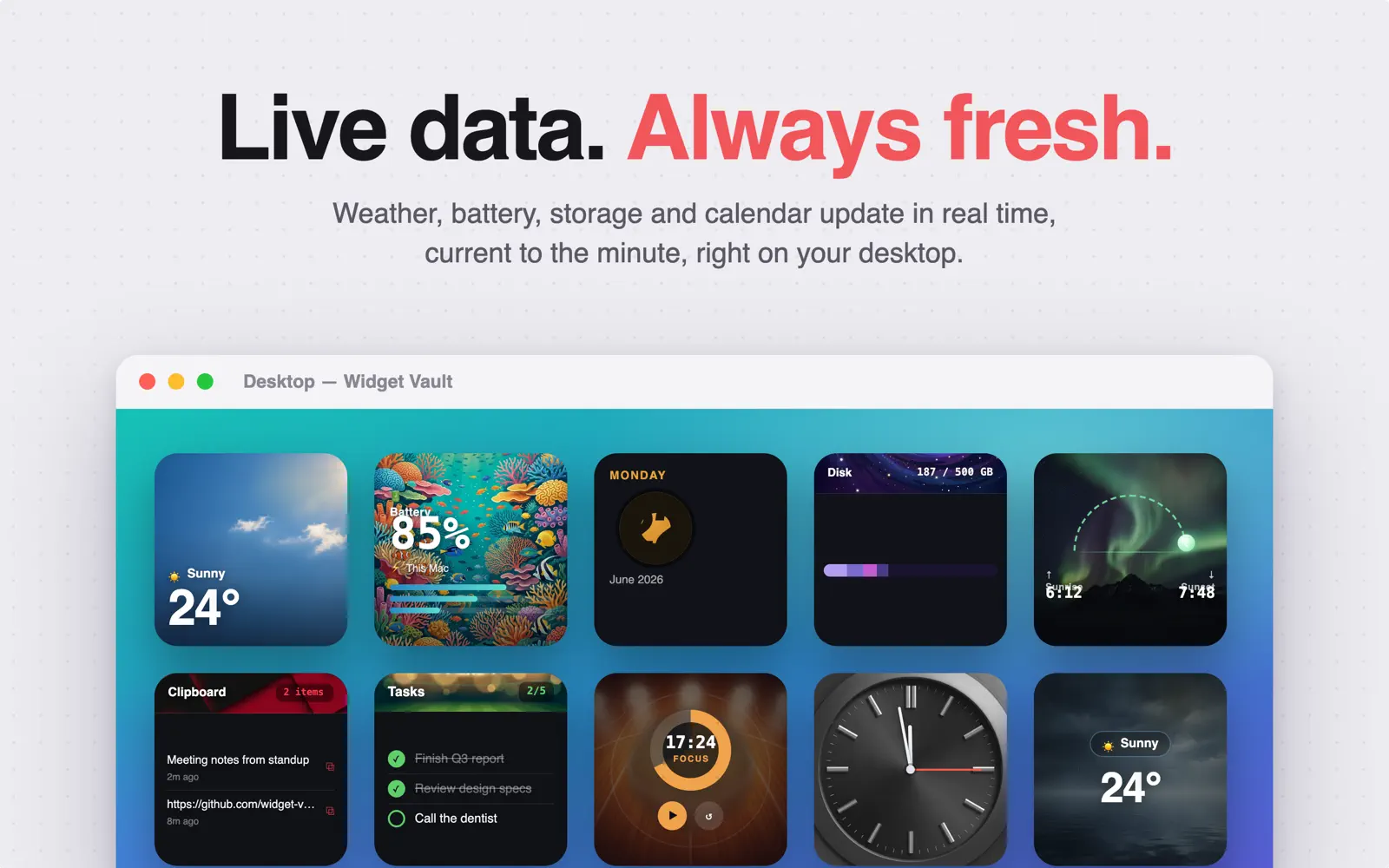
Every widget updates live and restyles in a click — from Synthwave to Coral Reef, Vintage Vinyl to Deep Space.


Every widget. One app.
Ten desktop widgets in Small, Medium and Large sizes, each with multiple design variants, Dark Mode, and Liquid Glass on macOS 26.
On your desktop in under a minute
Widget Vault uses native macOS widgets — nothing floats over your windows, nothing drains your battery.
Download free
Get Widget Vault from the Mac App Store and open it once so macOS registers its widgets.
Pick a widget & style
Browse all 10 widgets in the gallery and choose from 55+ themed designs with a live preview.
Add it to the desktop
Control-click your wallpaper → Edit Widgets, find Widget Vault, and drag any widget anywhere.
It stays live
Weather, battery, tasks and timers update in real time — start a Pomodoro or copy a clip right on the widget.
New to Mac widgets? Read the full guide: How to add widgets to your Mac desktop →
Guides & how-tos
Everything about Mac desktop widgets — setup, fixes, and getting more from every widget.
How to Add Widgets to Your Mac Desktop
Desktop and Notification Center widgets on macOS Sonoma, Sequoia and Tahoe — step by step.
Read guide →Mac Widgets Not Showing or Greyed Out? 8 Fixes
Why widgets turn grey, disappear, or stop updating — and how to fix each cause.
Read guide →Clock Widget for Mac: Analog & Digital
Put a Classic, Neon, Retro LCD or Flip clock on your desktop — free.
Read guide →Weather Widget for Mac Desktop
Live conditions, temperature and sunrise/sunset — powered by Apple WeatherKit.
Read guide →Pomodoro Timer Widget for Mac
Run focus sessions from the desktop itself — start, pause and reset on the widget.
Read guide →To-Do List Widget for Mac
Keep tasks on the desktop and check them off without opening an app.
Read guide →Clipboard History Widget for Mac
See your recent copies at a glance and re-copy any item with one click.
Read guide →Battery Widget for Mac
Show battery percentage on your desktop with ring, bar and grid styles.
Read guide →Calendar Widget for Mac Desktop
A month grid with event dots or an agenda view, always in sight.
Read guide →Disk Space Widget for Mac
Check how full your Mac is with a live storage donut or stacked bar.
Read guide →Liquid Glass Widgets in macOS 26 Tahoe
What Liquid Glass means for widgets — and how to get the look on your desktop.
Read guide →Frequently asked questions
Quick answers about Mac desktop widgets and Widget Vault.
How do I add widgets to my Mac desktop?
On macOS 14 Sonoma or later, Control-click (right-click) your desktop wallpaper and choose Edit Widgets, then drag any widget onto the desktop. Widget Vault widgets appear in that gallery once you've opened the app once. You can also add them to Notification Center. Learn more →
Why are my Mac desktop widgets grey or faded?
macOS dims desktop widgets to monochrome when an app window is active. Open System Settings → Desktop & Dock and set Widget style to Full color to keep widgets vivid at all times. Also make sure "Show Widgets on Desktop" is on. Learn more →
Is there a clock widget for Mac with analog and digital styles?
Yes. Widget Vault includes an analog clock widget with 6 faces (Classic, Minimal, Roman Numeral, Vintage, Neon, Swiss Railway) and a digital clock with 5 styles (Retro LCD, Minimalist, Gradient, Terminal, Flip) — both free. Learn more →
Can I see live weather on my Mac desktop?
Yes. The weather widget shows current conditions and temperature for your location using Apple WeatherKit, and a sunrise & sunset widget tracks daylight with arc and timeline styles — updating automatically through the day. Learn more →
Can I put a Pomodoro timer on my Mac desktop?
Yes. Widget Vault's interactive Pomodoro widget runs focus sessions right on the desktop — start, pause and reset from the widget itself, no app window needed. It's free, with 5 styles. Learn more →
How do I see my clipboard history on a Mac?
macOS only remembers your most recent copy. Widget Vault's clipboard history widget keeps your latest copied items visible on the desktop, and one click copies any of them again. Learn more →
Can my Mac show battery percentage on the desktop?
Yes. The battery widget shows your Mac's charge percentage as a ring, bar or icon grid, always visible on the desktop — no squinting at the menu bar. Learn more →
Does Widget Vault support macOS 26 Tahoe and Liquid Glass?
Yes. Widget Vault is built for macOS 26 Tahoe with native Liquid Glass styling — widgets pick up the translucent look that refracts your wallpaper. It also runs on macOS 14 Sonoma and macOS 15 Sequoia. Learn more →
Is Widget Vault free?
Yes — the download is free and includes both clocks and the Pomodoro timer. Premium unlocks all 10 widgets: $1.99/month with a 7-day free trial, $9.99/year, or $19.99 once for lifetime. See it on the Mac App Store →
Does Widget Vault collect my data?
No. Everything stays on your Mac — no account, no ads, no tracking. Weather comes from Apple's own WeatherKit, and your to-dos, clipboard items and settings never leave your device. Read the privacy policy →
Give your Mac desktop a glow-up
Join Mac users who start their day with live widgets. Free download — clocks and Pomodoro included, no account required.
macOS 14+ · 7-day free Premium trial